



Full-Service Accessibility Remediation vs. Automated Overlays: Cost, Legal Risk, and Real Accessibility
If you're responsible for your organization's website accessibility strategy, you've likely encountered two very different approaches to compliance:
- Automated accessibility overlays that promise instant compliance through a simple JavaScript widget.
- Full-service accessibility remediation that involves auditing, fixing, testing, and validating the actual source code of your website.
At first glance, overlays appear attractive. They're inexpensive, easy to install, and often market themselves as a fast path to ADA or WCAG compliance.
That being said, when organizations look beyond the marketing claims, the comparison becomes much clearer.
The choice ultimately comes down to this:
Do you want a temporary workaround, or do you want to address the underlying accessibility issues that create risk for users and your organization?
This is the one question I ask potential customers when they consider overlays. It’s an instant qualification question for me.
Let’s dive deeper.
What Is an Accessibility Overlay?
Accessibility overlays are third-party tools that inject JavaScript into your website after the page loads.
Popular examples include products that offer:
- Font resizing
- Color contrast controls
- Reading guides
- Text spacing adjustments
- Automated image descriptions
- Accessibility toolbars
The promise is simple: install a snippet of code and improve accessibility without modifying your website's underlying codebase.
While these tools may provide some convenience features for certain users, they generally do not remediate the underlying accessibility barriers that exist within a website.
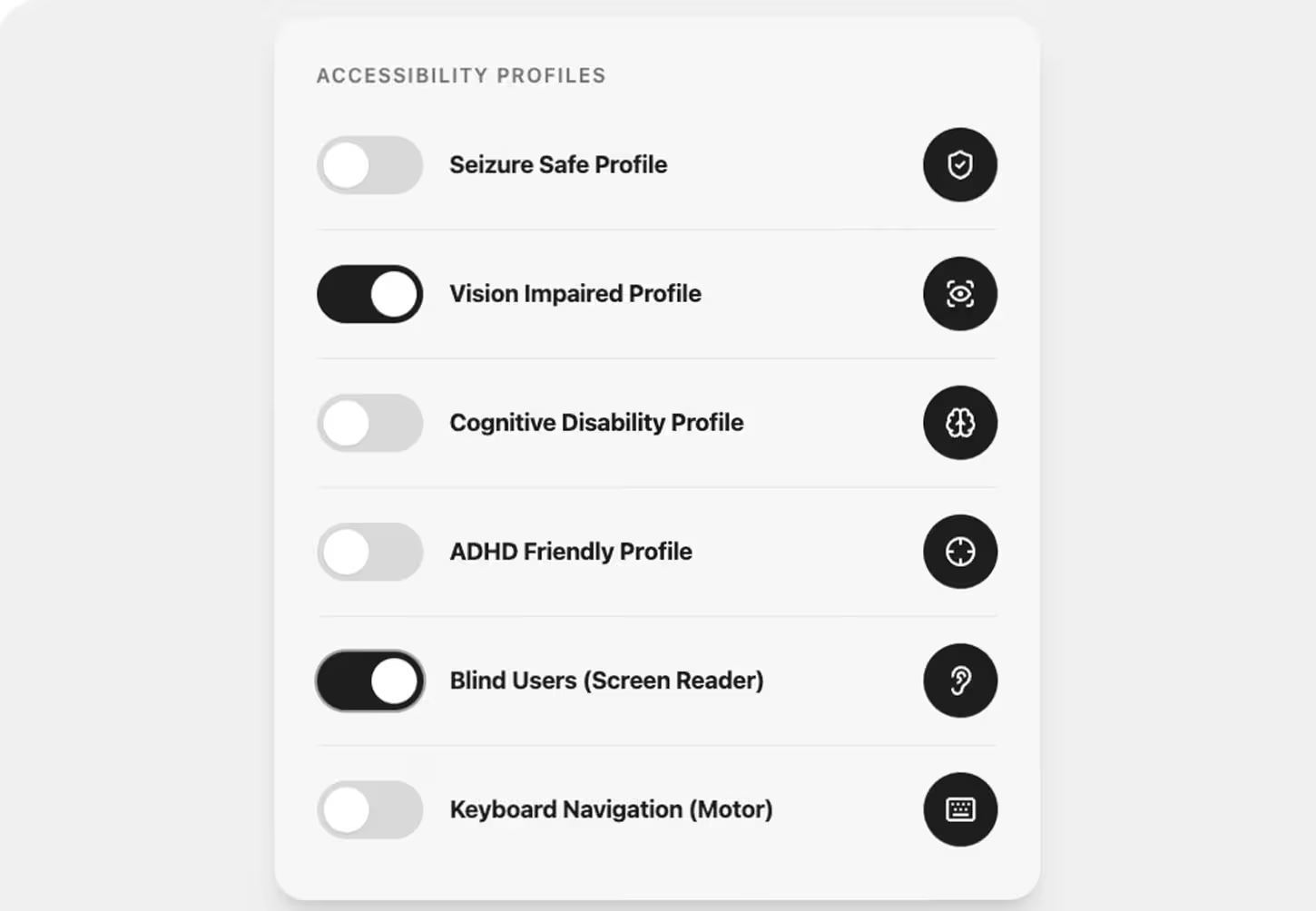
Example of an accessibility overlay providing preset profiles and interface adjustments for different user needs
What Is Full-Service Accessibility Remediation?
Full-service remediation focuses on correcting accessibility issues within the website itself.
This process typically includes:
- Automated scanning
- Manual accessibility auditing
- Screen reader testing
- Keyboard navigation testing
- Code remediation
- Content remediation
- Design review
- WCAG validation
- Ongoing monitoring and support
Rather than attempting to alter the user experience after the page loads, remediation permanently fixes the source code and content that users interact with.
Side-by-Side Comparison
| Feature | Full-Service Remediation | Automated Overlay |
|---|---|---|
| Cost | Typically $5,000–$50,000+ depending on scope | Typically $49–$499/month |
| Compliance Approach | Fixes underlying code and content | Adds a JavaScript layer on top of existing issues |
| Accessibility Coverage | Addresses automated and manual WCAG issues | Primarily addresses a limited set of automated issues |
| Risk Reduction | Demonstrates a documented remediation effort and resolves accessibility barriers | Underlying accessibility barriers often remain |
| WCAG Alignment | Remediation is performed against WCAG success criteria | Does not address many WCAG requirements on its own |
| User Experience | Native accessibility improvements built into the website | Requires interaction with an additional toolbar or interface |
| Assistive Technology Compatibility | Tested with actual assistive technologies | May create conflicts with assistive technologies |
| Maintenance & Ownership | Improvements become part of the website itself | Accessibility depends on an ongoing third-party subscription |
| Long-Term Value | Permanent improvements to a digital asset | Recurring subscription cost with limited underlying improvements |
Cost: Upfront Investment vs. Ongoing Risk
One reason overlays remain popular is price.
Many overlay providers charge less than a few hundred dollars per month. Compared to a professional accessibility audit and remediation project, the difference can seem substantial.
However, the comparison often overlooks the long-term cost of unresolved accessibility barriers.
A website that still contains inaccessible forms, navigation, documents, checkout flows, or custom functionality may continue to create risk regardless of whether an overlay is present.
Full-service remediation requires a larger initial investment, but it creates lasting improvements to the website itself rather than renting a temporary layer of functionality.
Legal Considerations
Organizations often purchase overlays because they believe the software will protect them from accessibility complaints or lawsuits.
Unfortunately, accessibility widgets do not automatically make a website compliant with the ADA or WCAG.
The primary issue is that overlays generally leave the underlying code unchanged.
If a form cannot be properly completed with a keyboard, if a screen reader cannot interpret page structure correctly, or if important content remains inaccessible, those barriers still exist regardless of the overlay.
Courts and regulators generally evaluate the accessibility of the user experience itself, not whether a website displays an accessibility toolbar.
Organizations seeking to reduce risk should focus on identifying and fixing accessibility barriers rather than relying solely on automated software claims.
Do you want a temporary workaround, or do you want to address the underlying accessibility issues that create risk for users and your organization?
Effectiveness: Where Human Expertise Matters
Accessibility is highly contextual.
For example:
- An automated tool cannot reliably determine whether image alternative text accurately describes the purpose of an image.
- Automation cannot fully evaluate whether custom application workflows are understandable to screen reader users.
- Automated scans cannot verify whether complex interactive components behave correctly with assistive technologies.
- Automated testing cannot fully assess usability for real users with disabilities.
Human accessibility specialists can identify and remediate issues that automated tools routinely miss.
This is why organizations pursuing meaningful accessibility improvements typically combine automated testing with manual auditing and validation.
User Experience Considerations
Most users with disabilities already rely on their preferred assistive technologies, including:
- Screen readers
- Screen magnifiers
- Voice control software
- Keyboard navigation
- Browser accessibility settings
When accessibility is built directly into the website, these tools work naturally.
When accessibility is layered on top through an overlay, users may encounter duplicated controls, conflicting functionality, or inconsistent experiences.
The most accessible experience is usually one where the website itself is designed and coded correctly from the start.

Which Approach Is Right for Your Organization?
An overlay may provide a quick way to add user controls and accessibility preferences.
However, organizations that are serious about accessibility, compliance efforts, user experience, and risk reduction should understand that overlays are not a substitute for remediation.
If your goal is to:
- Improve accessibility for people with disabilities
- Align with WCAG 2.2 AA standards
- Reduce accessibility-related risk
- Create a better user experience
- Build long-term accessibility into your digital presence
Then fixing the underlying code, content, and design issues is the more effective path.
The Bottom Line
Accessibility overlays attempt to compensate for accessibility problems after a website loads.
Full-service accessibility remediation eliminates those problems at their source.
While overlays may appear less expensive initially, they often leave the most significant accessibility barriers unresolved.
Organizations seeking lasting accessibility improvements should prioritize auditing, remediation, testing, and ongoing accessibility governance rather than relying solely on automated tools.
At Ally, we help organizations achieve WCAG 2.2 AA conformance through a fully managed process that includes auditing, remediation, validation, certification, and ongoing support—because true accessibility starts with fixing the website itself.